
ENGINEERING ENGAGEMENTSECURE DEVELOPMENTAI PENTESTING

PRIVATE ENGINEERING ENGAGEMENT · SECURE DEVELOPMENT · OCTOBER 2026

PentestGPT Control Center: AI-assisted pentesting mission control

PentestGPT is a cybersecurity tool leveraging Artificial Intelligence to assist ethical hackers during penetration testing, but out of the box it operates strictly via raw terminal commands. At Indomitus One, we engineered its visual mission control: a local, hardened web dashboard that enables operators to control PentestGPT with any compatible LLM, governing targets, execution stages, and findings in real time from a single screen.

02 — THE TECHNICAL CHALLENGE

What operational problem does PentestGPT Control Center solve?

While PentestGPT accelerates security testing through AI reasoning, managing it exclusively through raw terminal commands creates four key operational hurdles that our dashboard resolves:

CHALLENGE 01CLI COMPLEXITY

Lack of global situational awareness in terminal

Tracking AI responses and tool outputs across multiple command-line windows makes it difficult to quickly visualize the active audit stage.

DEVELOPED SOLUTION

A visual dashboard featuring a 5-stage progress tree, color-categorized console filtering, and a structured findings registry.
CHALLENGE 02SCOPE RISK

Authorized target enforcement (Scope Guard)

During an engagement, it is crucial to ensure that no command or AI reasoning probe inadvertently targets IP addresses outside the authorized subnet.

DEVELOPED SOLUTION

Automated CIDR whitelist enforcement: if the target IP falls outside the allowed subnet range, the system blocks execution immediately.

CHALLENGE 03FLEXIBILITY & PRIVACY

Freedom of AI model selection

Engagements vary: some require 100% offline local inference for strict confidentiality, while others demand switching providers on the fly.

DEVELOPED SOLUTION

Integrated model selector compatible with any PentestGPT model, including private offline execution without sending data to external APIs.

CHALLENGE 04OPERATIONAL CONTROL

Emergency abort (Kill Switch)

If an anomaly occurs during testing in a sensitive production lab, the operator needs to halt all activity instantly without orphaned processes.

DEVELOPED SOLUTION

Prominent emergency stop button (Kill Switch) that aborts the active mission, plus a Lock button to seal access with one click.

03 — THE DEVELOPED SOLUTION

The interface from within: clear, structured, and under control.

Explore real screenshots of the platform. You can switch between the operations dashboard and the unlock screen, or click on the five numbered hotspots to inspect each module.

http://127.0.0.1:8787 — PentestGPT Control Center
REAL SYSTEM SCREENSHOT
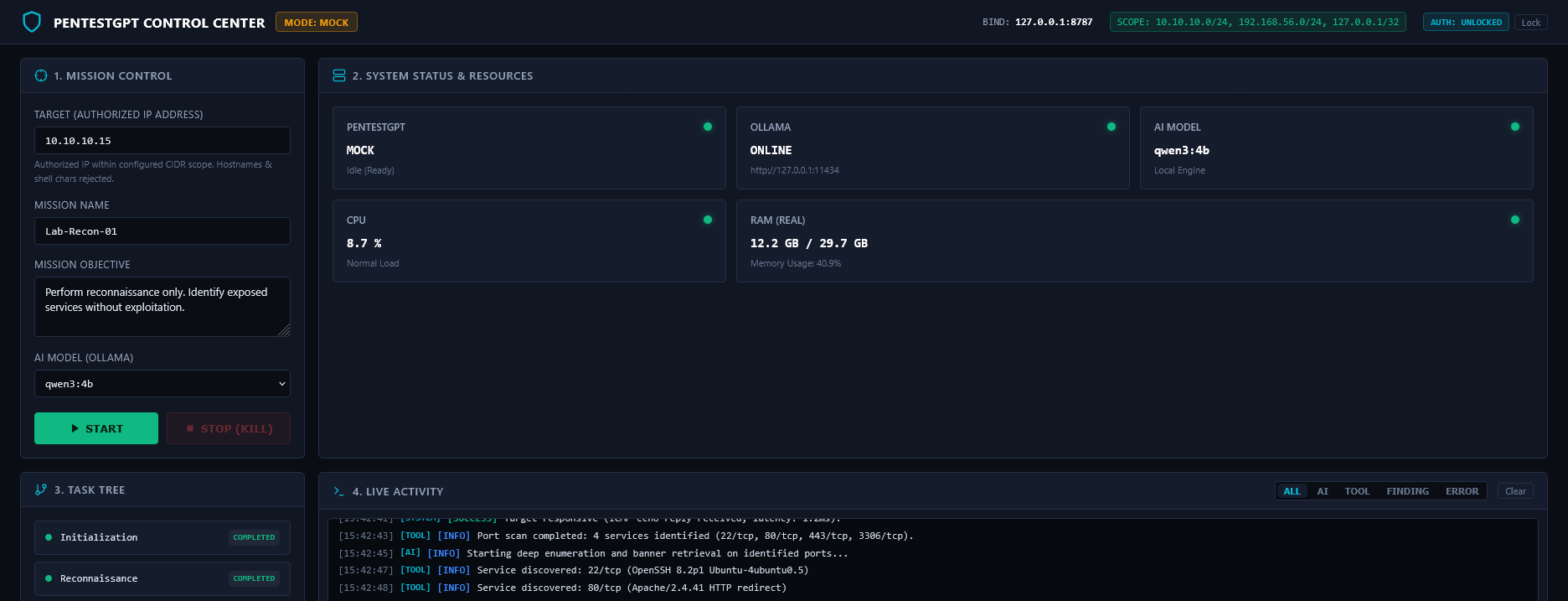
Real screenshot of PentestGPT Control Center dashboard showing Mission Control, System Status, Task Tree and Live Activity console
MODULE 01LEFT PANEL

Mission Control (Command Panel)

Where the operator enters the target IP (10.10.10.15), assigns the mission name, specifies instructions, chooses the LLM to use with PentestGPT, and triggers START or immediate STOP / KILL.

MODULE 02TOP-CENTER PANEL

System Status & Hardware

Displays at a glance the PentestGPT engine state, connection health to the configured AI provider, and real hardware telemetry: CPU (8.7%) and RAM (12.2 GB).

MODULE 03BOTTOM-LEFT PANEL

Task Tree (Progress Tree)

Divides the engagement into 5 clear stages (Initialization, Reconnaissance, Enumeration, Analysis, and Findings) to clearly see completed steps and active tasks.

MODULE 04BOTTOM-RIGHT CONSOLE

Live Activity (Real-Time Console)

Streams all incoming events in real time ([SYSTEM], [AI], [TOOL], [FINDING]) with instant category filtering without drowning in thousands of CLI lines.

MODULE 05TOP BAR

Security Badges & Session Lock

Continuously displays loopback isolation (BIND: 127.0.0.1:8787), authorized subnets (SCOPE CIDR), session status, and the instant Lock button to seal the panel.

http://127.0.0.1:8787 — Local Operator Authentication Barrier
SESSION SECURITY
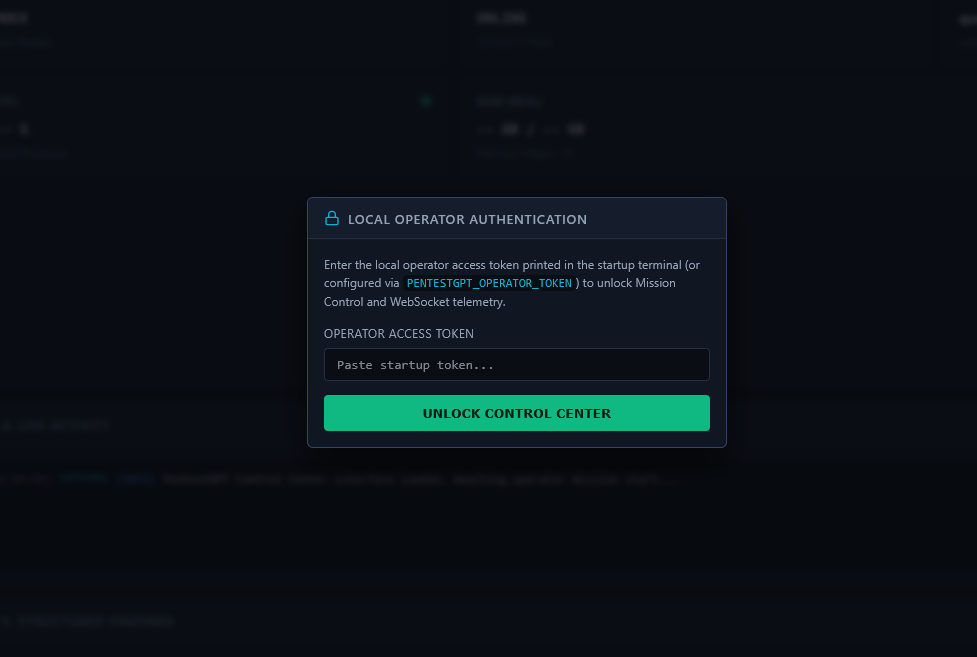
Real screenshot of the Local Operator Authentication modal requesting the ephemeral RAM token generated at startup
SECURITY 01ZERO DISK SECRETS

Ephemeral RAM-Only Token

Upon startup, the access key is held strictly in RAM memory, leaving zero credential artifacts or tokens stored on disk.

SECURITY 02PREVENTIVE LOCK

Sealed Interface by Default

Until the operator inputs the valid startup token, the UI remains blurred and all real-time WebSocket channels reject connections.

SECURITY 03INSTANT TEARDOWN

One-Click Lock Button

Clicking the Lock button in the top-right corner immediately invalidates the session and disconnects active telemetry streams.

04 — ARCHITECTURE & SECURITY

Six integrated security layers in system architecture.

Built using Python (FastAPI), WebSockets, and clean web standards. Click on each layer to inspect its defensive invariants:

LAYER 01 · VISUAL AUTONOMY

Lightweight Zero-Dependency Frontend

Standard HTML5 / CSS3 / Vanilla JS · 0 CDNs

0 External CDNs

The dashboard is served directly from the local server without loading third-party libraries, fonts, or scripts from the Internet.

DEFENSIVE INVARIANTS IN THIS LAYER

  • Zero external browser requests: the interface runs seamlessly in air-gapped lab networks without Internet access.
  • Fast, clean layout organizing all PentestGPT engine outputs into a consolidated single-screen workspace.
  • Defensive data rendering to prevent Cross-Site Scripting (XSS) when displaying raw technical findings.
ORIGINLocal Operator (127.0.0.1)
ACTIVE LAYERLightweight Zero-Dependency Frontend
DEFENSE RESULT0 External CDNs
LAYER 02 · NETWORK ISOLATION

Loopback-Isolated FastAPI Server

Exclusive loopback binding on 127.0.0.1:8787

Bind: 127.0.0.1:8787

The software only listens on the operator’s own computer, preventing other devices on the LAN or Wi-Fi from reaching the panel.

DEFENSIVE INVARIANTS IN THIS LAYER

  • Strict loopback binding to 127.0.0.1:8787 (never exposed to 0.0.0.0 or shared network interfaces).
  • Host and Origin header filtering on every HTTP and WebSocket handshake to mitigate cross-origin attacks.
  • Strict 16 KiB request payload size ceiling to prevent memory exhaustion.
ORIGINLocal Operator (127.0.0.1)
ACTIVE LAYERLoopback-Isolated FastAPI Server
DEFENSE RESULTBind: 127.0.0.1:8787
LAYER 03 · ZERO DISK SECRETS

Ephemeral RAM-Only Authentication

RAM Startup Token + CSRF-Protected Sessions

RAM Token + Anti-CSRF

Unlocking the panel requires an ephemeral key generated in RAM upon startup, leaving zero passwords or secrets persisted on disk.

DEFENSIVE INVARIANTS IN THIS LAYER

  • Random 192-bit token generated and maintained strictly in process memory while running.
  • Protected sessions using HttpOnly cookies (SameSite=Strict) and anti-CSRF token verification on all actions.
  • Top-bar Lock button that immediately revokes the session and tears down active data streams.
ORIGINLocal Operator (127.0.0.1)
ACTIVE LAYEREphemeral RAM-Only Authentication
DEFENSE RESULTRAM Token + Anti-CSRF
LAYER 04 · SCOPE ENFORCEMENT

CIDR Scope Enforcement (Scope Guard)

Subnet whitelists with Fail-Closed policy

Fail-Closed Policy

A defensive guardrail validating every target IP address against allowed subnets before allowing any probe to launch.

DEFENSIVE INVARIANTS IN THIS LAYER

  • Fail-Closed Policy: if a target does not belong to authorized subnets, the action is blocked instantly.
  • Strict IP parsing and character whitelisting to eliminate command injection vectors.
  • Safe parameterized execution avoiding system shell invocations (shell=False).
ORIGINLocal Operator (127.0.0.1)
ACTIVE LAYERCIDR Scope Enforcement (Scope Guard)
DEFENSE RESULTFail-Closed Policy
LAYER 05 · REAL TIME

Real-Time WebSocket Telemetry

Event streaming with automated session teardown

Heartbeat 1.0s

Instant communication channel pushing task tree updates, console logs, and findings without page reloads.

DEFENSIVE INVARIANTS IN THIS LAYER

  • Concurrency throttling and strict 1 KiB frame boundaries to ensure rock-solid stability.
  • 1.0s Heartbeat ensuring active session validity before forwarding telemetry.
  • Immediate channel disconnect the moment the operator seals the panel or the session expires.
ORIGINLocal Operator (127.0.0.1)
ACTIVE LAYERReal-Time WebSocket Telemetry
DEFENSE RESULTHeartbeat 1.0s
LAYER 06 · TOTAL CONTROL

Multi-LLM Adapter for PentestGPT & Kill Switch

Compatible with any AI model + Emergency Stop

Multi-LLM + Kill Switch

Flexible architecture allowing operators to use any LLM compatible with PentestGPT (offline local models or remote providers) with emergency abort.

DEFENSIVE INVARIANTS IN THIS LAYER

  • Support for any model integrated with PentestGPT: from local offline models via Ollama (Qwen, Llama, CodeLlama) to remote engines.
  • Dual operational modes (MOCK / LIVE) for risk-free operator training or live lab operations.
  • Hardware-level Kill Switch that immediately halts the running process when the operator clicks STOP.
ORIGINLocal Operator (127.0.0.1)
ACTIVE LAYERMulti-LLM Adapter for PentestGPT & Kill Switch
DEFENSE RESULTMulti-LLM + Kill Switch

05 — METHODOLOGY & VALIDATION

How we engineered and hardened the platform.

Development was completed in four disciplined phases: from visual workflow mapping to three security hardening rounds and automated test suites.

01
PHASE 01 · DESIGN & USABILITY

From raw CLI to an intuitive mission control

We translated PentestGPT’s terminal workflow into a structured graphical interface, dividing the screen into mission control, task tree, filtered console, and findings.

  • Comprehensive single-screen operation eliminating the need to juggle multiple terminal tabs.
  • Integrated simulation mode to test workflows and train operators safely.
  • Real-time hardware monitoring of local CPU and RAM utilization.
02
PHASE 02 · SECURITY BY DESIGN

Local isolation and strict target boundaries

We engineered the tool following minimal exposure principles so the dashboard is only accessible to the operator and strictly acts on authorized targets.

  • Exclusive loopback binding (127.0.0.1:8787), inaccessible across the local network or Wi-Fi.
  • Mandatory CIDR range verification before allowing any command to execute.
  • Parameterized execution without invoking shell interpreters.
03
PHASE 03 · THREE HARDENING CYCLES

Hardening sessions, memory, and communications

We subjected the platform to three exhaustive security reviews and hardening cycles to lock down access control and real-time streaming channels.

  • Ephemeral credentials held in RAM (zero disk secrets) and anti-CSRF session protection.
  • Strict traffic boundaries across HTTP and WebSockets for rock-solid stability.
  • Instantaneous channel termination upon clicking the Lock button.
04
PHASE 04 · AUTOMATED VERIFICATION

Automated pytest suite and SHA-256 integrity

We validated every defensive invariant through automated test suites to ensure the platform handles invalid inputs and emergency stops flawlessly.

  • Automated test suite verifying scope enforcement, sessions, limits, and the Kill Switch.
  • Pinned dependency baseline for stable execution on Linux (Kali) and Windows.
  • Package verified using cryptographic SHA-256 integrity checksums.
RESULT 01

Intuitive visual operation

Security operators oversee PentestGPT through a clean dashboard without juggling multiple terminal windows.

RESULT 02

Model-agnostic interoperability

Ready to run with any LLM supported by PentestGPT, including private offline models to safeguard sensitive target data.

RESULT 03

Verified code hardening

Code fortified across three review cycles and validated via automated pytest suites and SHA-256 checksums.

06 — INTERACTIVE DEMONSTRATION

Test how an operational order runs in the platform.

Select one of the three sample missions, filter live console streams, or test the STOP button (Kill Switch) to see the dashboard’s interactive behavior.

STEP 1 · DEFINE ORDER IN MISSION CONTROL
OPERATOR INPUT
TARGET (AUTHORIZED IP ADDRESS)
10.10.10.15✓ AUTHORIZED CIDR
MISSION NAME
Lab-Recon-01
AI MODEL (PENTESTGPT)
LLM Model (PentestGPT)
MISSION OBJECTIVE (PROMPT TO AI ENGINE)
Identify exposed TCP services and inspect service banners within the authorized lab subnet without running exploitation modules.

What this order executes: Identify open ports and exposed services on the authorized IP (10.10.10.15) without running active exploit payloads.

STEP 2 · VALIDATION & LIVE STREAM CONSOLE
INTERACTIVE SIMULATOR
Scope CIDR VerifiedTarget within whitelist
Secure ParametersValidated without shell=True
AI Engine ConnectedReady in PentestGPT
4. LIVE ACTIVITY STREAM (DEMO DATA)
[00:00:01] [SYSTEM] [INFO] Target 10.10.10.15 verified inside allowed CIDR 10.10.10.0/24
[00:00:02] [AI] [PLAN] AI reasoning model configured for non-intrusive TCP service enumeration
[00:00:04] [TOOL] [EXEC] Service banner inspection completed: open ports 22/tcp (OpenSSH), 80/tcp (Apache), 443/tcp, 3306/tcp
[00:00:06] [FINDING] [HIGH] Port 3306/tcp (MySQL) exposed on internal segment without host restriction
STOP (KILL SWITCH)

At any point, the operator can click STOP to abort the active mission immediately and cleanly terminate background processes.

[ 07 — REQUEST DEMO OR TAILORED DEVELOPMENT ]

Interested in a demonstration of PentestGPT Control Center or developing a custom tool for your organization?

We design custom management consoles and internal applications that transform complex technical processes into visual, hardened, and accessible tools:

VALUE 01 · MINIMAL SURFACE

Hardened internal panels

Operational dashboards and management utilities with network isolation, session hardening, and strict access control.

VALUE 02 · AI FLEXIBILITY

Integration with any LLM

Model-agnostic connection tailored to your workflow, including private offline inference to protect critical target data.

VALUE 03 · RIGOROUS ENGINEERING

Fortified and verified code

Software engineered with security by design, strict input sanitization, and built-in emergency abort mechanisms.

Contact us to request a demonstration of the project or to discuss the custom software solutions your business requires.