
Why I Got Tired of Fighting the Terminal and Built My Own GUI for PentestGPT
Hey there, reader! Whether you live and breathe cybersecurity or are just curious about tech, you've probably heard about AI agents operating as de facto ethical hackers. There are plenty out there, but today I want to talk about PentestGPT: an open-source AI assistant designed to reason through security assessments step-by-step and conduct ethical hacking much like an experienced practitioner would. It sounded brilliant on paper, but in practice, babysitting multiple raw CLI consoles quickly turned tedious. That’s when I asked myself: "Why not build a real graphical cockpit for this beast?". Here is how PentestGPT Control Center came to life.

First things first: what is PentestGPT and why did it grab my attention?
In cybersecurity, all the methodical steps an analyst takes to probe a server, network, or web application to uncover vulnerabilities before malicious actors do is called pentesting (penetration testing).
Traditional security assessments require meticulous diligence, deep domain expertise, and high mental overhead. But like every other industry, artificial intelligence is reshaping the field. That is where PentestGPT steps in. It connects the penetration testing lifecycle with modern Large Language Models (Claude, Ollama, OpenAI...) running either locally on your hardware or through secure APIs. Think of it as an orchestrator: it inspects open ports and running services, reasons about the most logical attack vectors, and maintains a structured mental tree of the entire audit.
Any analyst can run it (in authorized lab environments, of course). You install PentestGPT, fire up the terminal, and start issuing prompts. So what’s the catch? Strictly speaking, none. You could easily spend hours parsing scrolling command outputs and taking manual notes in a text file. But if we can make the workflow smoother, more intuitive, and just as rigorous, why not build it?
One afternoon, I accidentally closed a background terminal window right in the middle of a crucial audit step with PentestGPT. Right after letting out a couple of well-deserved curses at myself, the realization hit: "Enough is enough. If I build software and secure infrastructure for a living, why not engineer a proper visual cockpit where every single thread, finding, and decision tree is laid out in plain sight?" That was day zero.
From a wall of raw text to a true mission cockpit
From the outset, my goal wasn't just to slap a "pretty web theme" over a CLI wrapper. My primary focus was operational utility: transforming messy, disjointed text dumps into an ultra-clean, high-signal dashboard (and if it looked slick along the way, even better). I broke down the interface into the exact visual blocks I always found myself missing inside the terminal:
- My left-hand compass (PTT Tree): Instead of guessing what phase the AI is currently tackling, I have an interactive tree displaying audit milestones (Reconnaissance, Enumeration, Verification...) that light up in real-time as progress unfolds.
- A console you can actually read: I color-coded stream events with dedicated category filters (
SYSTEM,AI,TOOL, andFINDING). If I only want to review what the AI is deliberating or check newly flagged vulnerabilities, a single click eliminates the operational noise. - The gems discovered along the way (Findings Drawer): Whenever a notable vulnerability emerges, it pins instantly to the right-hand panel with a standardized severity badge (
CRITICAL,HIGH,MEDIUM,LOW). No more scrolling up through thousands of lines trying to locate an exploit output from thirty minutes ago.
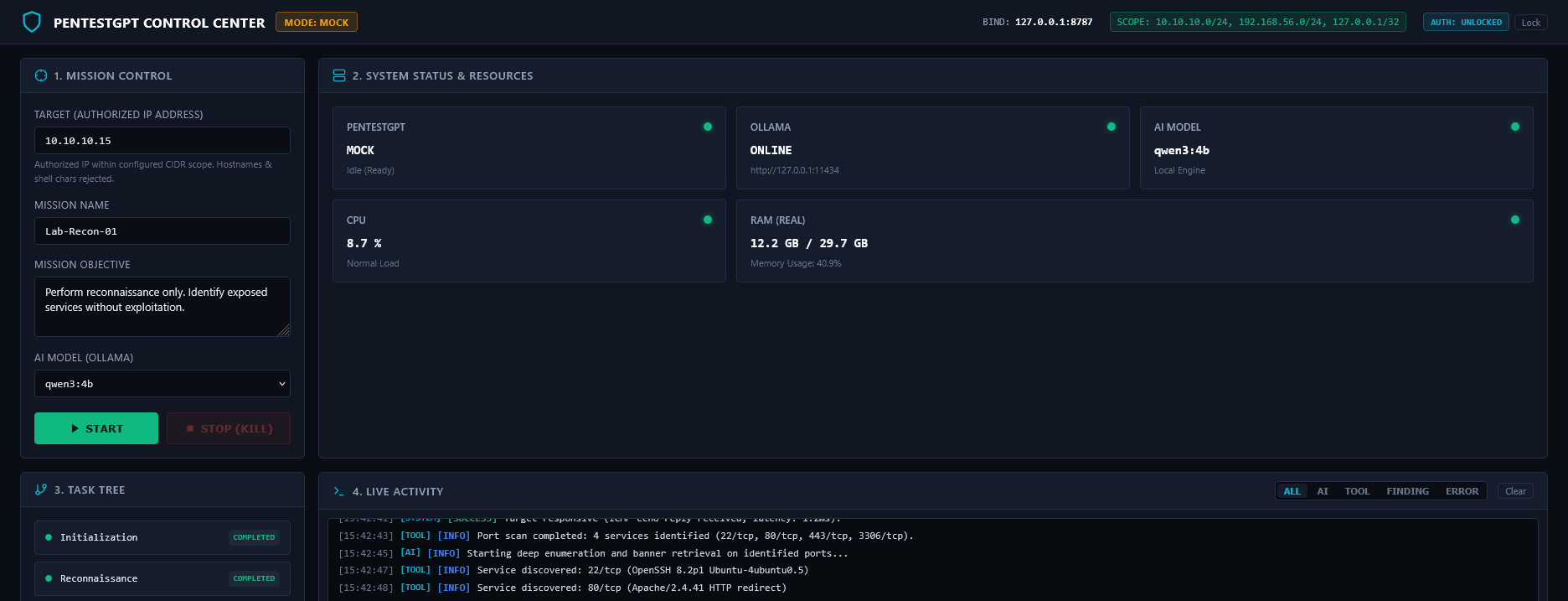
Complete freedom: orchestrate PentestGPT with whichever AI model you prefer
Another non-negotiable requirement from day one was zero vendor lock-in to a single LLM provider. The beauty of PentestGPT lies in its modular flexibility: via local inference engines or cloud APIs, you can plug in whichever model best matches your audit goals.
Auditing sensitive internal assets where confidentiality is paramount? Hook it up to a 100% air-gapped local model running via Ollama on your own machine so zero packets ever leave your perimeter. Working in an isolated training lab where you want maximum reasoning depth? Select your preferred cloud LLM from the dropdown before hitting START, and you're good to go.
The IP bodyguard and the big red button (Kill Switch)
Let’s be honest: humans make mistakes. On a late Friday afternoon, when focus starts waning, anyone can mistype an octet in an IP address. In cybersecurity, firing an offensive probe against the wrong host is no joke. Imagine the implications if a client commissions a customized deployment and an operator targets an unauthorized asset.
To eliminate this risk, I implemented two defensive guardrails that deliver immense operational peace of mind:
- The Scope CIDR Gatekeeper: Before PentestGPT executes a single reconnaissance packet, the backend verifies that the target IP strictly belongs to your pre-authorized subnet whitelist. If a typo places the destination outside authorized boundaries, the execution is rejected immediately.
- The Hardware-Style Kill Switch: A high-visibility
STOPbutton pinned to the header. If you observe that a scan has yielded its objective or need to abort immediately, a single click terminates all active sub-processes and disconnects the run instantly.
Hardening the tool: building a vault inside a vault
When dealing with offensive security tools, defensive rigor must be twice as strict. Building a powerful cockpit means nothing if the cockpit itself introduces attack surface.
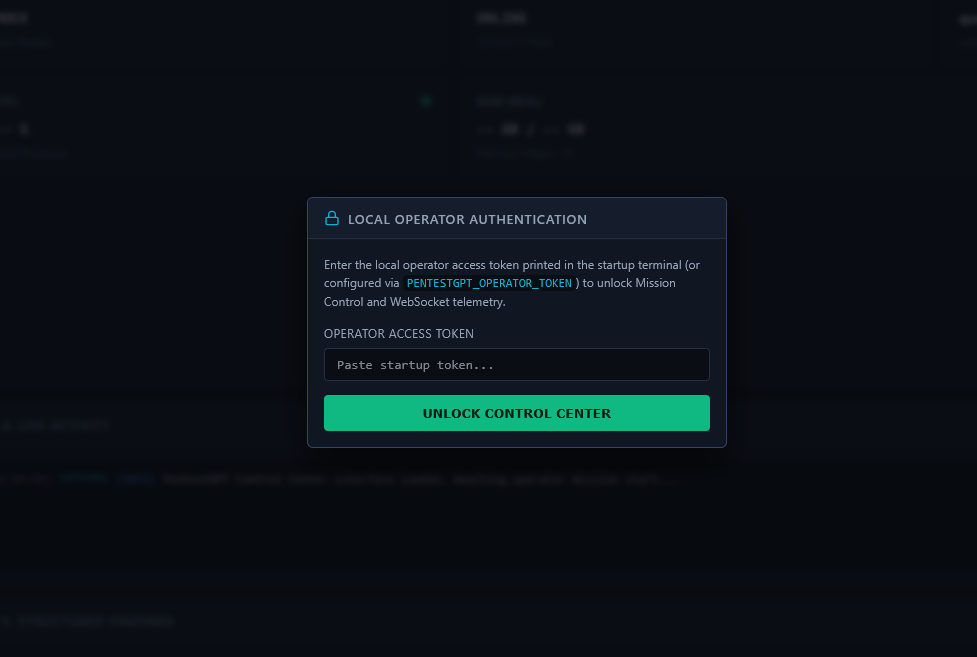
So I put on my auditor hat against my own code and conducted three consecutive rounds of defensive hardening:
- Strict Localhost Isolation (
127.0.0.1): The web server binds exclusively to the loopback interface. No device on the local Wi-Fi or internal subnet can even detect that the management port is listening. - Ephemeral In-Memory Tokens: Every time the daemon spins up, it generates a fresh cryptographic session key in RAM and outputs it solely to the local stdout terminal. No plaintext credentials on disk, no databases to compromise.
- Instant Panic Lock: Stepping away from the desk for a coffee? Hitting
Lockimmediately destroys the session and severs all active WebSocket pipelines.
Key takeaways from this journey
Architecting PentestGPT Control Center reminded me why I fell in love with this craft in the first place. Artificial intelligence is not here to replace the critical judgment of a cybersecurity professional; it exists to eliminate repetitive, mechanical drudgery so we can focus on strategic reasoning. AI allows you to move faster and think broader, but taming it requires intuitive interfaces, strict guardrails, and uncompromising security fundamentals.
Whether you are an industry practitioner or simply passionate about applied technology, want to take a closer look at the GUI? In the dedicated project dossier linked here, you can review architectural breakdowns, test an interactive command simulator, and run simulated audit scenarios.